
Survivors,
The wait is over and the beta is open!
Jump right in, have your fill, and share your thoughts through the feedback survey (found on the title screen). We love it when we hear how much you enjoy the game. We love it even more when we hear your valuable ideas to make God Save Birmingham even better!
Getting into the Beta
If you have not requested access yet, it’s time to head to our store page and click on the “Request Access” button right now!

 If you already requested access, but do not see the God Save Birmingham Playtest app in your library, try completely closing and relaunching Steam to force a refresh.
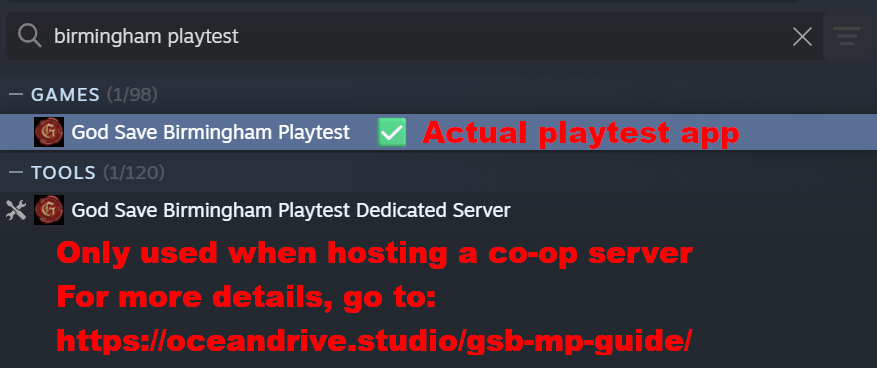
Once you’re in, you will now see the following apps in your Steam library: God Save Birmingham Playtest and God Save Birmingham Playtest Dedicated Server. The playtest app is what everyone should download for beta testing. The dedicated server app is required only when you are hosting a server–more details can be found later in this post.

 What’s New in This Beta?
We worked on expanding and improving upon the earlier beta build in June, and bring you some highly-requested features including:
- Save/load system utilizing an auto-save slot
- Expanded survival systems
- Smarter zombies
- Character customization
- UI/UX/quality-of-life improvements
- And an alpha state multiplayer mode!
For a more detailed list of changes, check out the patch notes.
Your Beta Mission: Feedback & Bug Reporting
Your feedback is crucial for us to continue improving the game and adding new features! Please make sure you fill out the feedback survey, which can be found on the bottom left of the title screen.

 For any bugs, please utilize the in-game bug reporting feature, powered by BetaHub. The bug submission button is located on the Esc menu, so please report bugs immediately as they happen. If you include logs and video clips, they help our team to investigate and fix those bugs!


 Beta Schedule Reminder


As a friendly reminder, please note the beta test schedule. Once the test ends, the app will become unplayable and hidden from your library.
|
Region
|
Start
|
End
|
|---|---|---|
|
North America (PST / EST)
|
PST: Nov 2, 3 PM
EST: Nov 2, 6 PM
|
PST: Nov 9, 10 AM
EST: Nov 9, 1 PM
|
|
United Kingdom (GMT)
|
Nov 2, 11 PM
|
Nov 9, 6 PM
|
|
Europe (CET)
|
Nov 3, 12 AM
|
Nov 9, 7 PM
|
|
Korea (KST)
|
Nov 3, 8 AM
|
Nov 10, 3 AM
|
Playing Co-Op
We are bringing multiplayer to God Save Birmingham! Please note that this feature is still in an alpha state and an active work in progress. There currently is no in-game text/voice chat, so we highly recommend that you coordinate with friends. If you’re looking for public lobbies, feel free to find a group on our Discord server, where we will also have some temporary voice chat channels that you can use.
For co-op, you may join a server or open your own for others to join:
- If you plan to join someone else’s server, you need their server information to use in-game to join
- If you plan to host a server for others to join, you would need to set up a dedicated server
There are 2 different methods for creating a dedicated server. Please note that you only need 1 server for the session!
We outlined the general process for each method below. Please refer to the co-op guide for more detailed instructions!
-
Nitrado
For Beta #2, we partnered with Nitrado to facilitate dedicated server setup! Visit our Discord server with this special link and click the button for a chance to receive a Nitrado voucher along with instructions on how to redeem it. The voucher gives you access to a God Save Birmingham dedicated server on Nitrado until the end of Beta #2! Due to the limited number of vouchers, please be respectful of others and only claim a voucher if you are hosting the server. Guests do not need a voucher! -
Dedicated Server App
Alternatively, to set up a server on a machine you own, you can use the God Save Birmingham Playtest Dedicated Server app, which is granted together with beta access. The app requires port forwarding and firewall whitelisting, outlined in the co-op guide. If you encounter issues, please reach out to ODS staff on our Discord server.
If you encounter any questions or issues during the beta, please do not hesitate to reach out to us on Discord!
Play the beta now!
– ODS Team
DISCORD | X/TWITTER | FACEBOOK | INSTAGRAM | YOUTUBE | TWITCH | TIKTOK


